¶ Ubiquiti UniFi OS Dynamic DNS Setup
This is a short and sweet howto on configuring dynamic DNS on your Dream Machine Pro (or similar) with Cloudflare
¶ Cloudflare Setup
- Login to Cloudflare and on the left menu expand on Manage Account and then click on API Tokens.
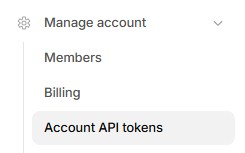
- On the right side click on Create Token

-
On the next screen select the Edit zone DNS template and click on Use Template

-
The next screen will be Account API tokens.
- Permissions
-- Zone: DNS: Edit - Zone Resources
-- Include: Specific Zone: Yourdomain.com
Skipt the Client IP Address Filtering and click Continue to Summary on the bottom.
-
On the summary screen just click the Create Token button.
-
The next screen will have your token. Copy it to a safe location, you will need it in the next step.
¶ Ubiquiti Setup
- Login to your Ubiquit Gateway. Make sure you are in the Network. On the left bar click on the settings wheel, then click on Internet then click on your Internet connection. This will pop up a menu on the right with the propertied of your Internet Connection.
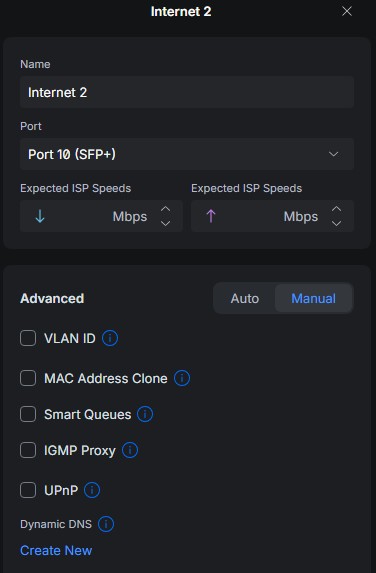
- Under Advanced select Manual, scroll down to Dynamic DNS and cliuck on Create New
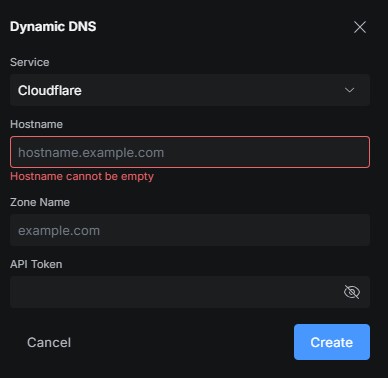
-
Type in your hosrname (ex. firewall.yourdomain.com), your zone is yourdomain.com and type in the API Token you got earlier from Cloudflare.
-
Click Create