¶ Expand the root partition
In this case we have a Linux VM runnning on Proxmox. During installation we used LVM and made the root partition 50GB. Now we want to expand it to 200GB. Below are the steps to accomplish the task
¶ Add extra space in Proxmox
-
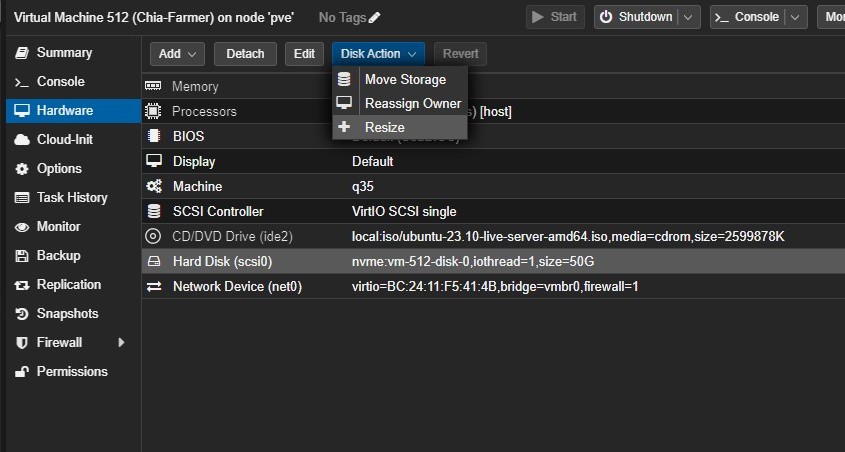
Select your VM, then click on Hardware. Select your disk, click on Disk Action and then Resize
-
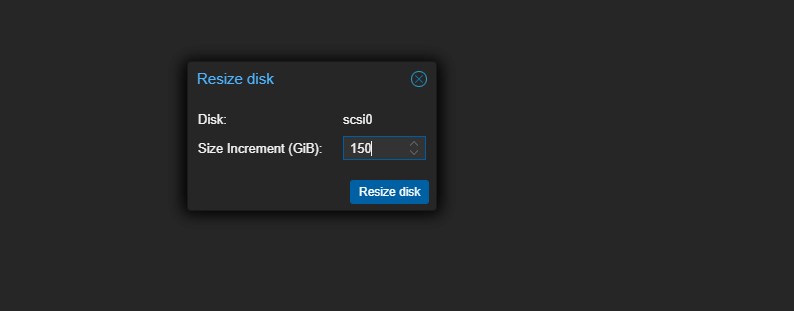
Add another 150GB
-
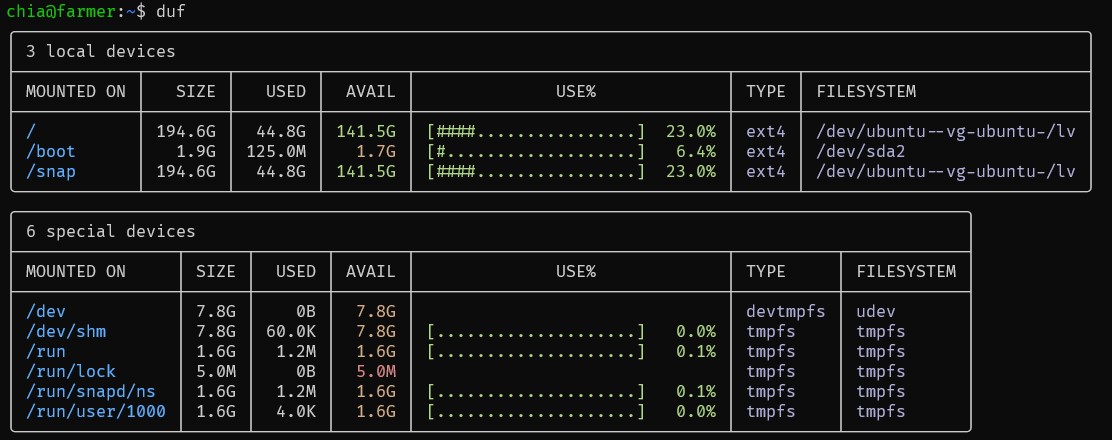
The result should look like the picture below. We went from 50GB to 200GB

¶ Resize the root
- We have had df since the beginning of time to check disk usage. It works and it is great. We now have duf and it is way cooler and gives you a colorful output as a bonus. We need to install that first using the command below:
sudo apt install duf
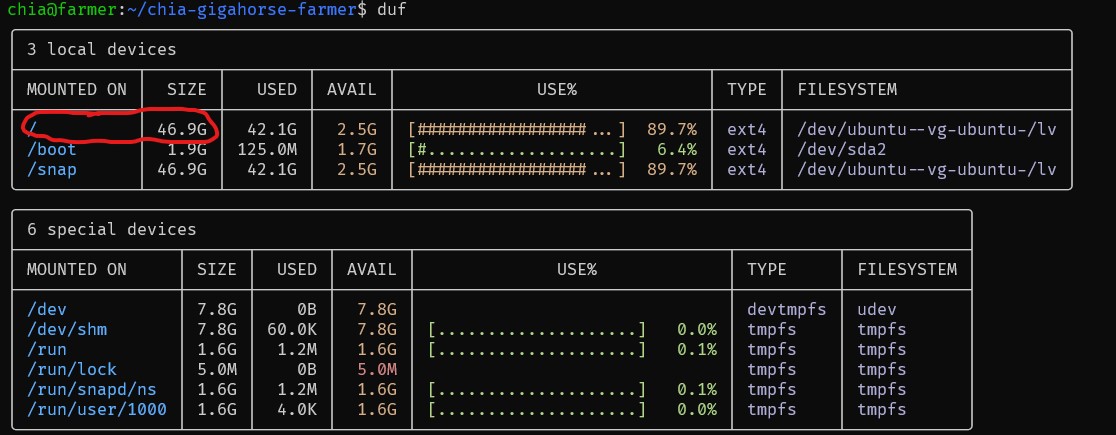
- Let's see what we have by typing duf. The output is below:
- Run cfdisk at the command prompt
sudo cfdisk

Select your /dev/sda3 partition from the list and then select Resize from the bottom menu. Hit ENTER and it will prompt you to confirm the new size. Hit ENTER again and you will now see the /dev/sda3 partition with a new larger size.
Select Write from the bottom menu, type yes to confirm, and hit ENTER. Then use q to exit the program.
Now that the LVM partition backing the /dev/sda3 Physical Volume (PV) has been extended, we need to extend the PV itself. Run pvresize /dev/sda3 to do this and then use pvdisplay to check the new size.
- Now that the LVM partition backing the /dev/sda3 Physical Volume (PV) has been extended, we need to extend the PV itself.
sudo pvresize /dev/sda3
The output will look like this:
  Physical volume "/dev/sda3" changed
  1 physical volume(s) resized or updated / 0 physical volume(s) not resized
- Run pvdisplay to see what we just did
sudo pvdisplay
The output will look like this:
  --- Physical volume ---
  PV Name               /dev/sda3
  VG Name               ubuntu-vg
  PV Size               <198.00 GiB / not usable 33.00 KiB
  Allocatable           yes
  PE Size               4.00 MiB
  Total PE              50687
  Free PE               38400
  Allocated PE          12287
  PV UUID               RIoRru-OQsQ-Koif-87EA-9fLc-QOA2-nE0Gsi
As you can see the PV size is now 198GB
- Run vgdisplay to see the Volume Group (VG) free space.
sudo vgdisplay
The output will look like this:
  --- Volume group ---
  VG Name               ubuntu-vg
  System ID
  Format                lvm2
  Metadata Areas        1
  Metadata Sequence No  5
  VG Access             read/write
  VG Status             resizable
  MAX LV                0
  Cur LV                1
  Open LV               1
  Max PV                0
  Cur PV                1
  Act PV                1
  VG Size               <198.00 GiB
  PE Size               4.00 MiB
  Total PE              50687
  Alloc PE / Size       12287 / <48.00 GiB
  Free  PE / Size       38400 / 150.00 GiB
  VG UUID               OPwb6v-tinN-IrU3-w6bI-YgNp-O3ba-SutDbD
- No we can see that we have 150GB worth of extra space. Let's exten the LV
sudo lvextend -l +100%FREE /dev/ubuntu-vg/ubuntu-lv
The output will look like this:
  Size of logical volume ubuntu-vg/ubuntu-lv changed from <48.00 GiB (12287 extents) to <198.00 GiB (50687 extents).
  Logical volume ubuntu-vg/ubuntu-lv successfully resized.
- At this point, the block volume underpinning our root filesystem has been extended, but the filesystem itself has not been resized to fit that new volume. Resize it by typing this command:
sudo resize2fs /dev/mapper/ubuntu--vg-ubuntu--lv
- Type duf to see the friuts of your labor. You have successfully resize the root filesystem while the host is running