¶ Format and mount drives without LVM
The screnario the server called Harvester has a new drive installed (/dev/sdb). The drive is used and has some partitions on it. We will wipe all partitions from it, create a new Linux partition that spans the whole disk and format it. We will mount it locally and also edit the /etc/fstab files and make sure that it mounts automatically after reboot. You can apply the same principle mentioned below for multiple drives. For example if you put 3 new drives in addition to the boot disk they will likely be named sdb, sdc and sdd.
¶ Install DUF
- We have had df since the beginning of time to check disk usage. It works and it is great. We now have duf and it is way cooler and gives you a colorful output as a bonus. We need to install that first using the command below:
sudo apt install duf
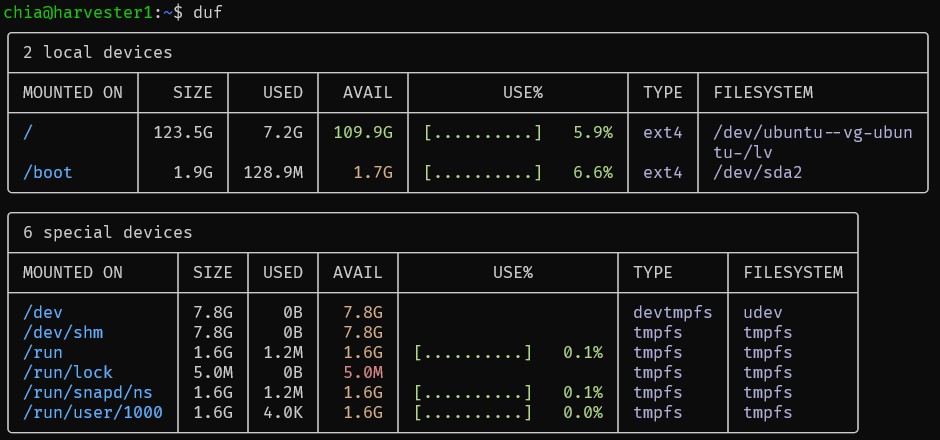
- Once duf is installed we simply type duf on the command line and output is shown below - nice and pretty. We can see what we have for disks, where they are mounted and how much space is used.
¶ Format and mount drive
- Type lsblk to see what we have for drives and partitions. In the case below our "new" drive is sdb, it is 256GB in size and it has two partitions sdb1 - 18.6GB and sdb2 - 128GB.
chia@harvester1:~$ lsblk
NAME                      MAJ:MIN RM   SIZE RO TYPE MOUNTPOINTS
loop0                       7:0    0  63.4M  1 loop /snap/core20/1974
loop1                       7:1    0 111.9M  1 loop /snap/lxd/24322
loop2                       7:2    0  53.3M  1 loop /snap/snapd/19457
loop3                       7:3    0  40.4M  1 loop /snap/snapd/20671
loop4                       7:4    0  63.9M  1 loop /snap/core20/2182
loop5                       7:5    0    87M  1 loop /snap/lxd/27037
sda                         8:0    0   128G  0 disk
├─sda1                      8:1    0     1M  0 part
├─sda2                      8:2    0     2G  0 part /boot
└─sda3                      8:3    0   126G  0 part
  └─ubuntu--vg-ubuntu--lv 253:0    0   126G  0 lvm  /
sdb                         8:16   0   256G  0 disk
├─sdb1                      8:17   0  18.6G  0 part
└─sdb2                      8:18   0   128G  0 part
sr0                        11:0    1     2G  0 rom
- Let's delete those partitions. To do this type the command below
sudo sfdisk --delete /dev/sdb
- Let's look at the output of lsblk and see how everything changed
chia@harvester1:~$ sudo sfdisk --delete /dev/sdb
chia@harvester1:~$ lsblk
NAME                      MAJ:MIN RM   SIZE RO TYPE MOUNTPOINTS
loop0                       7:0    0  63.4M  1 loop /snap/core20/1974
loop1                       7:1    0 111.9M  1 loop /snap/lxd/24322
loop2                       7:2    0  53.3M  1 loop /snap/snapd/19457
loop3                       7:3    0  40.4M  1 loop /snap/snapd/20671
loop4                       7:4    0  63.9M  1 loop /snap/core20/2182
loop5                       7:5    0    87M  1 loop /snap/lxd/27037
sda                         8:0    0   128G  0 disk
├─sda1                      8:1    0     1M  0 part
├─sda2                      8:2    0     2G  0 part /boot
└─sda3                      8:3    0   126G  0 part
  └─ubuntu--vg-ubuntu--lv 253:0    0   126G  0 lvm  /
sdb                         8:16   0   256G  0 disk
sr0                        11:0    1     2G  0 rom
-
Notice there are no partitions on sdb. It is just a 256GB disk. Now we can create one partition that spans the whole disk and format it.
-
Now let's make one primary patition that spans the whole disk. Type n for a new partition. Then type p for primary, select 1 as the partition number. Accept the defaults for the First sector by pressing ENTER and do the same for the Last Sector. Finally type w to write the partition table to the disk. The output of those commands is show below:
chia@harvester1:~$ sudo fdisk /dev/sdb

Welcome to fdisk (util-linux 2.37.2).
Changes will remain in memory only, until you decide to write them.
Be careful before using the write command.

Command (m for help): n
Partition type
   p   primary (0 primary, 0 extended, 4 free)
   e   extended (container for logical partitions)
Select (default p): p
Partition number (1-4, default 1): 1
First sector (2048-536870911, default 2048):
Last sector, +/-sectors or +/-size{K,M,G,T,P} (2048-536870911, default 536870911):

Created a new partition 1 of type 'Linux' and of size 256 GiB.

Command (m for help): w
The partition table has been altered.
Calling ioctl() to re-read partition table.
Syncing disks.
- Now let's check our work and make sure we did it all correctly by typing lsblk. Notice that now we have sdb1 under sdb and it spans the whole 256GB.
chia@harvester1:~$ lsblk
NAME                      MAJ:MIN RM   SIZE RO TYPE MOUNTPOINTS
loop0                       7:0    0  63.4M  1 loop /snap/core20/1974
loop1                       7:1    0 111.9M  1 loop /snap/lxd/24322
loop2                       7:2    0  53.3M  1 loop /snap/snapd/19457
loop3                       7:3    0  40.4M  1 loop /snap/snapd/20671
loop4                       7:4    0  63.9M  1 loop /snap/core20/2182
loop5                       7:5    0    87M  1 loop /snap/lxd/27037
sda                         8:0    0   128G  0 disk
├─sda1                      8:1    0     1M  0 part
├─sda2                      8:2    0     2G  0 part /boot
└─sda3                      8:3    0   126G  0 part
  └─ubuntu--vg-ubuntu--lv 253:0    0   126G  0 lvm  /
sdb                         8:16   0   256G  0 disk
└─sdb1                      8:17   0   256G  0 part
sr0                        11:0    1     2G  0 rom
- Format Drive by typing the command below:
sudo mkfs.ext4 -m 0 -T largefile4 -F /dev/sdb1
- Let's make a mount point for the drive
sudo mkdir -p /local/disk-01
- Find the UUID of the hard drive partition we just made and formatted by typing the command below:
sudo lsblk -o NAME,UUID /dev/sdb
The output should look something like this:
chia@harvester1:~$ sudo lsblk -o NAME,UUID /dev/sdb
NAME   UUID
sdb
└─sdb1 a7daf484-acc1-4793-b70a-866c72e29ede
The UUID is a7daf484-acc1-4793-b70a-866c72e29ede. Copy that because we will need it for the next step
- Edit /etc/fstab and add entry for a new partition that we will be mounting. Putting an entry in /etc/fstab ensures that the drive will be mounted upon reboot.
sudo nano /etc/fstab
Add the following entry to the bottom of the file and save:
/dev/disk/by-uuid/a7daf484-acc1-4793-b70a-866c72e29ede /local/disk-01 ext4 nofail,rw,noatime 0 0
- Mount the drive
sudo mount -a
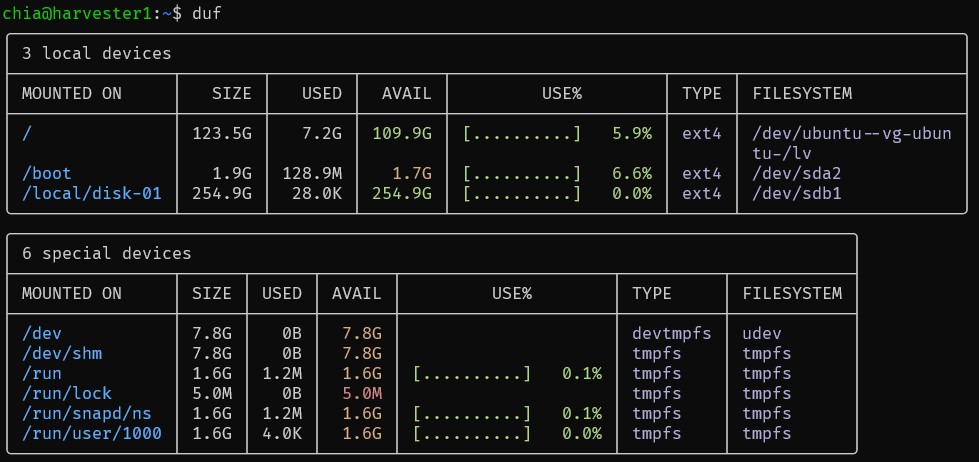
- At the dommand prompt type duf and in the output you will see your newly mounted drive on /local/drive-01 with a size of 256GB
¶ Format and mount drives with LVM
- Check the available drives on your system using the lshw command:
sudo lshw -C disk
Output:
  *-disk:0
       description: SCSI Disk
       product: QEMU HARDDISK
       vendor: QEMU
       physical id: 0.0.0
       bus info: scsi@2:0.0.0
       logical name: /dev/sda
       version: 2.5+
       size: 40GiB (42GB)
       capabilities: 5400rpm gpt-1.00 partitioned partitioned:gpt
       configuration: ansiversion=5 guid=83866134-7eba-4f70-b647-fb377837cdb7 logicalsectorsize=512 sectorsize=512
  *-disk:1
       description: SCSI Disk
       product: QEMU HARDDISK
       vendor: QEMU
       physical id: 0.0.1
       bus info: scsi@2:0.0.1
       logical name: /dev/sdb
       version: 2.5+
       size: 1TiB (1099GB)
       capabilities: 5400rpm
       configuration: ansiversion=5 logicalsectorsize=512 sectorsize=512
In This case we have two disks. The new one we just added is the 1TiB on /dev/sdb
- Display the existing physical volumes (PV) on your system, use the pvs command:
sudo pvs
Output:
  PV         VG        Fmt  Attr PSize   PFree
  /dev/sda3  ubuntu-vg lvm2 a--  <38.00g    0
- Create a new physical volume on the new disk (/dev/sda), use the pvcreate command:
sudo pvcreate /dev/sdb
Output:
Physical volume "/dev/sdb" successfully created.
- Verify the creation of the new physical volume using lvmdiskscan:
sudo lvmdiskscan -l
Output:
  WARNING: only considering LVM devices
  /dev/sda3  [     <38.00 GiB] LVM physical volume
  /dev/sdb   [       1.00 TiB] LVM physical volume
  1 LVM physical volume whole disk
  1 LVM physical volume
- Create a new volume group named mediavg using the new physical volume /dev/sdb:
sudo vgcreate mediavg /dev/sdb
Output:
Volume group "mediavg" successfully created
- Create a new logical volume named medialv within the mediavg volume group, using all available space:
sudo lvcreate -l +100%FREE -n medialv mediavg
Output:
Logical volume "medialv" created.
- Create an ext4 filesystem on the new logical volume:
sudo mkfs.ext4 /dev/mediavg/medialv
Output:
mke2fs 1.46.5 (30-Dec-2021)
Discarding device blocks: done
Creating filesystem with 268434432 4k blocks and 67108864 inodes
Filesystem UUID: 971fc20a-2132-4063-94f8-10bfcb473909
Superblock backups stored on blocks:
        32768, 98304, 163840, 229376, 294912, 819200, 884736, 1605632, 2654208,
        4096000, 7962624, 11239424, 20480000, 23887872, 71663616, 78675968,
        102400000, 214990848

Allocating group tables: done
Writing inode tables: done
Creating journal (262144 blocks): done
Writing superblocks and filesystem accounting information: done
- Create a mount point directory and mount the new filesystem:
sudo mkdir -p /media/storage
sudo mount /dev/mediavg/medialv /media/storage
- Verify the mount using the duf command:
duf
Output:
╭────────────────────────────────────────────────────────────────────────────────────────────────────────────────╮
│ 3 local devices                                                                                                │
├────────────────┬─────────┬────────┬────────┬───────────────────────────────┬──────┬────────────────────────────┤
│ MOUNTED ON     │    SIZE │   USED │  AVAIL │              USE%             │ TYPE │ FILESYSTEM                 │
├────────────────┼─────────┼────────┼────────┼───────────────────────────────┼──────┼────────────────────────────┤
│ /              │   37.1G │   7.1G │  28.1G │ [###.................]  19.2% │ ext4 │ /dev/ubuntu--vg-ubuntu-/lv │
│ /boot          │    1.9G │ 126.0M │   1.7G │ [#...................]   6.5% │ ext4 │ /dev/sda2                  │
│ /media/storage │ 1006.9G │  28.0K │ 955.6G │ [....................]   0.0% │ ext4 │ /dev/mediavg/medialv       │
╰────────────────┴─────────┴────────┴────────┴───────────────────────────────┴──────┴────────────────────────────╯
╭─────────────────────────────────────────────────────────────────────────────────────────────────╮
│ 6 special devices                                                                               │
├────────────────┬────────┬──────┬────────┬───────────────────────────────┬──────────┬────────────┤
│ MOUNTED ON     │   SIZE │ USED │  AVAIL │              USE%             │ TYPE     │ FILESYSTEM │
├────────────────┼────────┼──────┼────────┼───────────────────────────────┼──────────┼────────────┤
│ /dev           │   3.8G │   0B │   3.8G │                               │ devtmpfs │ udev       │
│ /dev/shm       │   3.9G │   0B │   3.9G │                               │ tmpfs    │ tmpfs      │
│ /run           │ 793.7M │ 1.0M │ 792.7M │ [....................]   0.1% │ tmpfs    │ tmpfs      │
│ /run/lock      │   5.0M │   0B │   5.0M │                               │ tmpfs    │ tmpfs      │
│ /run/snapd/ns  │ 793.7M │ 1.0M │ 792.7M │ [....................]   0.1% │ tmpfs    │ tmpfs      │
│ /run/user/1000 │ 793.7M │ 4.0K │ 793.7M │ [....................]   0.0% │ tmpfs    │ tmpfs      │
╰────────────────┴────────┴──────┴────────┴───────────────────────────────┴──────────┴────────────╯
- the UUID of the new filesystem
sudo blkid /dev/mediavg/medialv
Output
/dev/mediavg/medialv: UUID="971fc20a-2132-4063-94f8-10bfcb473909" BLOCK_SIZE="4096" TYPE="ext4"
- Edit the /etc/fstab file and add the following entry:
UUID=971fc20a-2132-4063-94f8-10bfcb473909 /media/storage ext4 defaults 0 2