¶ Configure a VPN Tunnel between a Fortigate and Cradlepoint
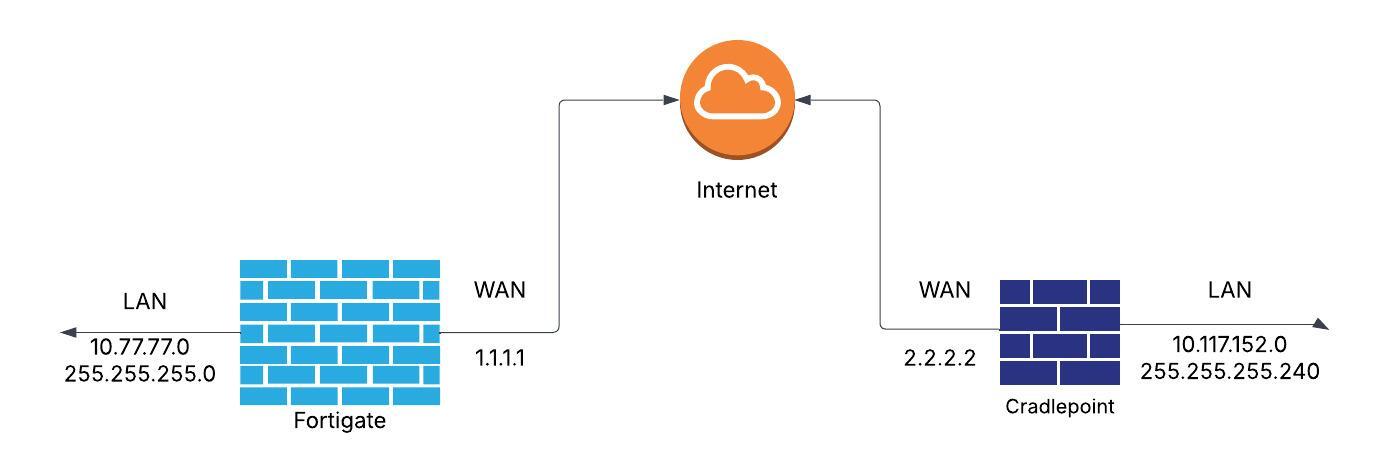
This document will guide you on how to create a site-to-site VPN tunner between a Fortigate FG200 and a Cradlepoint router/firewall. On the Cradlepoint we only have a GUI option for configuration while the Fortigate we can use either the web interface or the command line. Both options are referenced below. The diagram reflects the WAN IP addresses of both devices as well as the LAN subnets. Once configued the 10.77.77.0/24 subnet should be able to communicate bi-drectionally to the 10.117.152.0/28 subnet.
¶ Cradlepoint Configuration (WebIU)
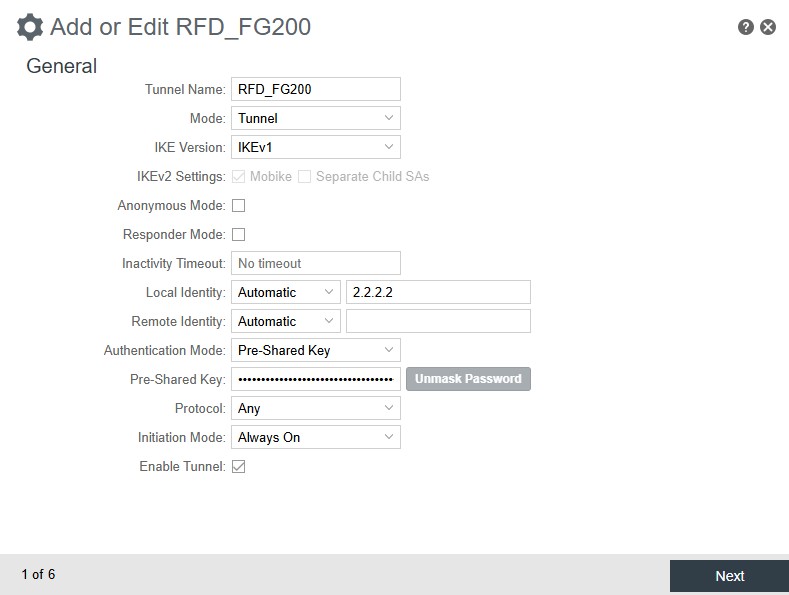
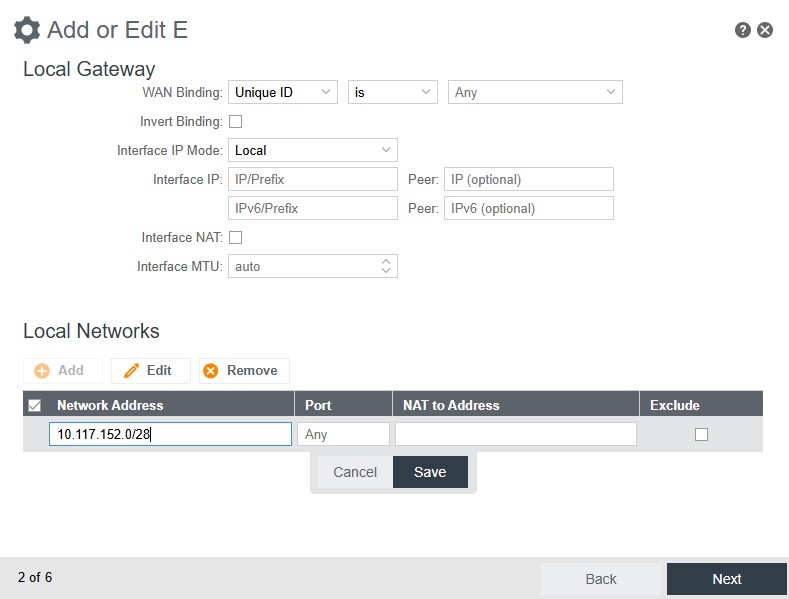
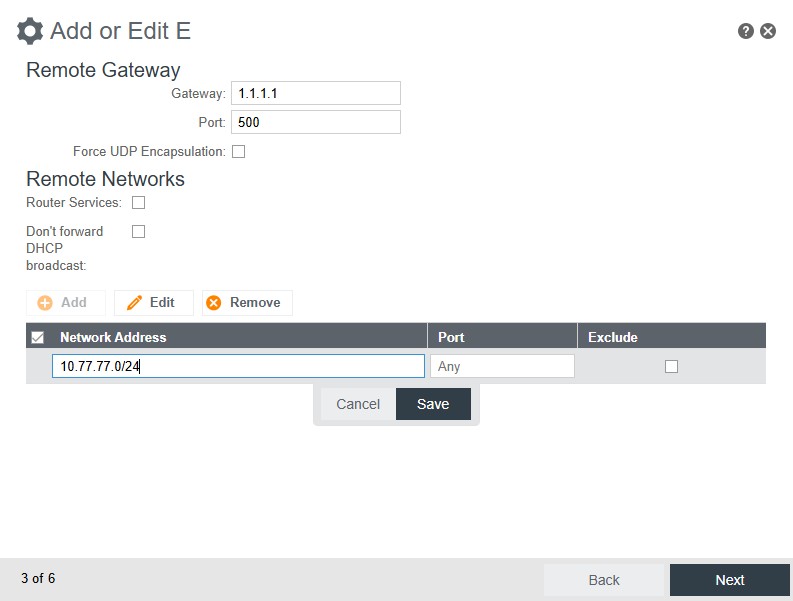
- Login to the Cradlepoint and on the left sidebar navifate to:
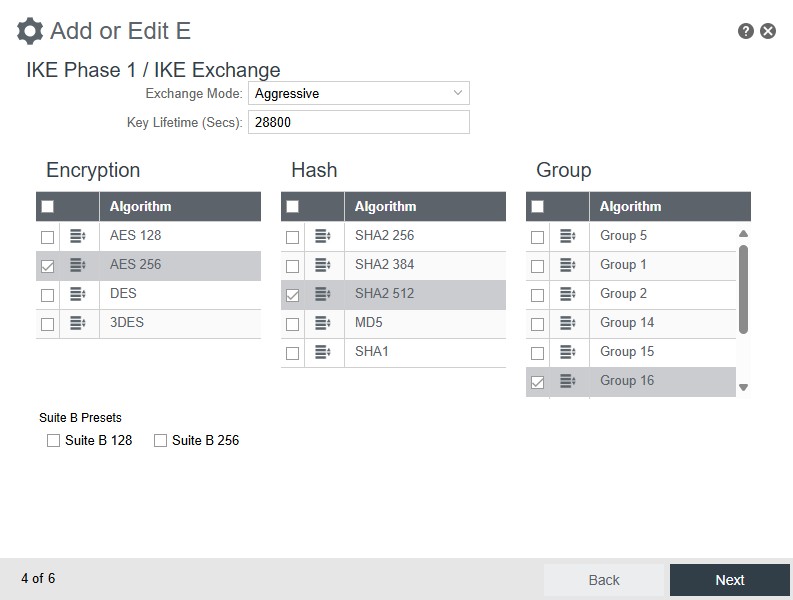
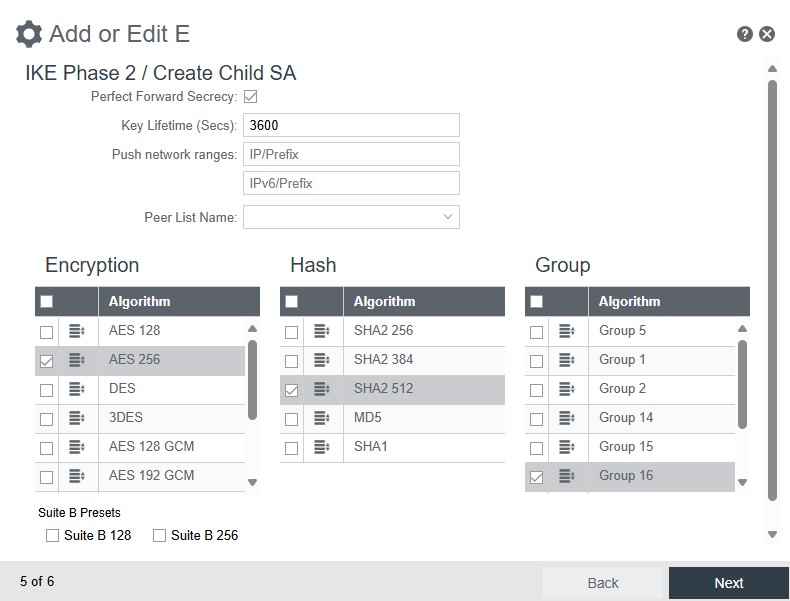
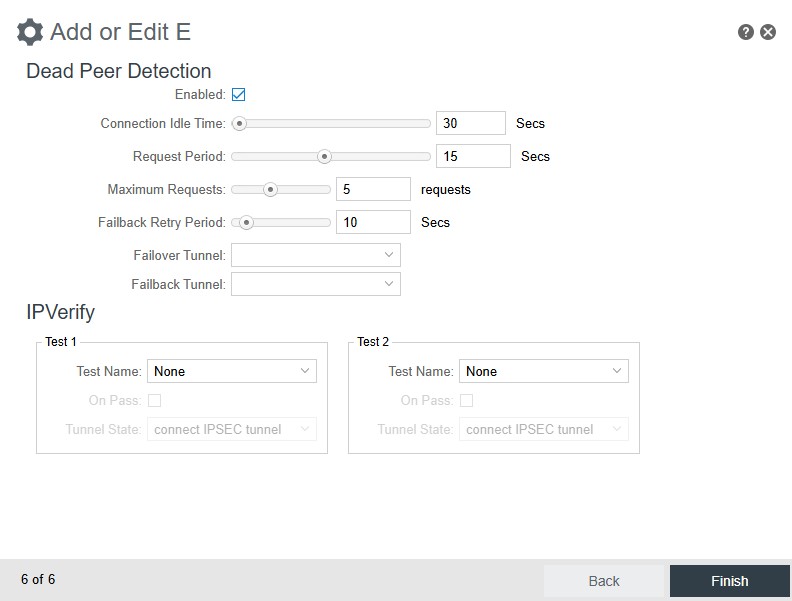
Networking - Tunnels - IPSec VPN, then click on the Add button in the middle section
Match your configuration to the screenshots below
¶ Fortigate Configuration (Command Line)
- Create address group
config firewall address
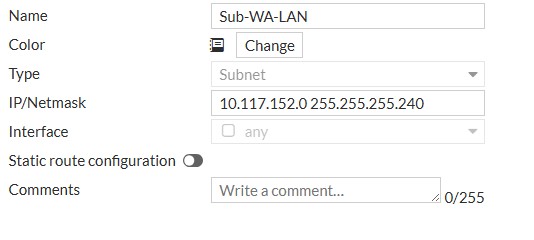
    edit "Sub-WA-LAN"
        set subnet 10.117.152.0 255.255.255.240
    next
end
- Configure VPN Phase 1 Interface
config vpn ipsec phase1-interface
    edit "Sub-WA"
        set interface "wan"
        set keylife 28800
        set mode aggressive
        set peertype any
        set net-device disable
        set proposal aes256-sha512
        set dhgrp 16
        set remote-gw 2.2.2.2
        set psksecret Very-Secret-Password!
    next
end
- Configure VPN Phase 2 Interface
config vpn ipsec phase2-interface
    edit "Sub-WA"
        set phase1name "Sub-WA"
        set proposal aes256-sha512
        set dhgrp 16
        set src-addr-type name
        set dst-addr-type name
        set keylifeseconds 3600
        set src-name "VPN-LAN-Subnets"
        set dst-name "Sub-WA-LAN"
    next
end
- Configure Static Route(s). The trick here is the number 39. It is a sequence number for the route. Your next static route will be number 40, so on and so forth. To check the last number used, open the command line interface on the fortigate and type show router shatic and see what the last number is, then use the next one.
config router static
    edit 39
        set dst 10.117.152.0 255.255.255.240
        set device "Sub-WA"
    next
end
- Confire BI-Directional Firewall Policies. Same situation as mentioned above. 73 and 74 are sequence numbers. If you want to know what the last one used is, just type show firewall policy on the command line and use the next one(s) available.
config firewall policy
    edit 73
        set name "Sub-WA-Local"
        set srcintf "Sub-WA"
        set dstintf "VLAN-777"
        set action accept
        set srcaddr "Sub-WA-LAN"
        set dstaddr "VPN-LAN-Subnets"
        set schedule "always"
        set service "ALL"
    next
    edit 74
        set name "Local-WA-Sub"
        set srcintf "VLAN-777"
        set dstintf "Sub-WA"
        set action accept
        set srcaddr "VPN-LAN-Subnets"
        set dstaddr "Sub-WA-LAN"
        set schedule "always"
        set service "ALL"
    next
end
- Once you are all done, wait a minute for the tunnel to come up and go to:
VPN - IPsec Tunnels and you will see the one you just built with a green arrow pointing up, similar to the picture below.

¶ Fortigate Configuration (WebUI)
If you don't like the command line interface, you can use the WebUI to accomplish the same things. Follow the steps below.
- Click on Policy and Objects - Addresses - Create New
- Click on VPN - IPsec Tunnels - Create New - IPSec Tunnel. Give it a name, select Custom and click on Next
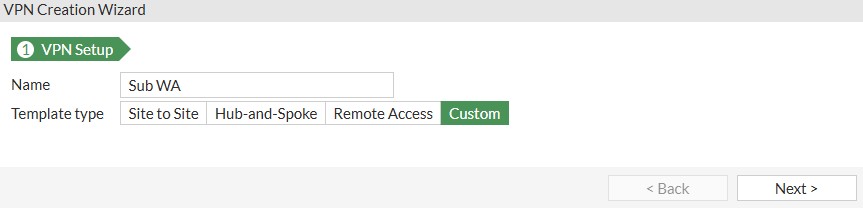
Follow the screenshots below to create the rest of the tunnel interface
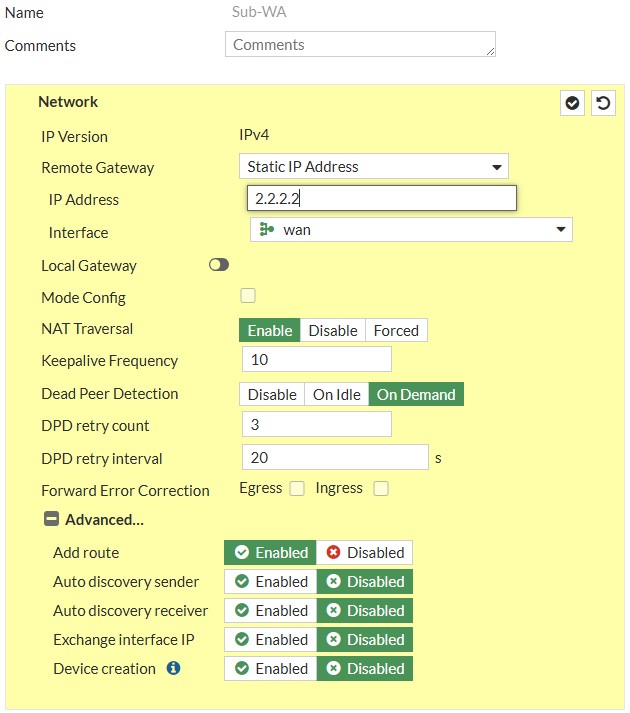
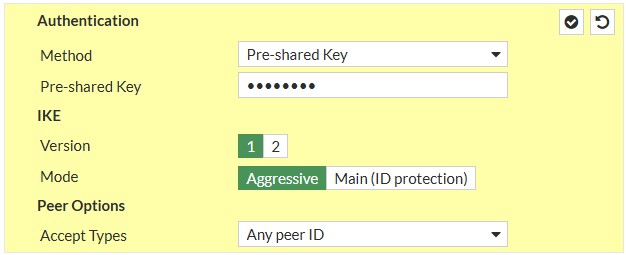
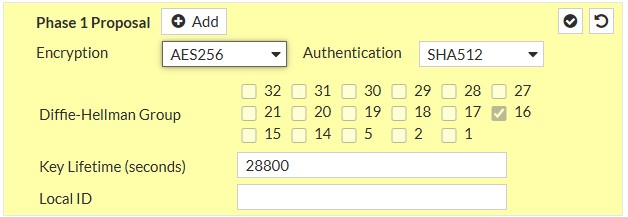

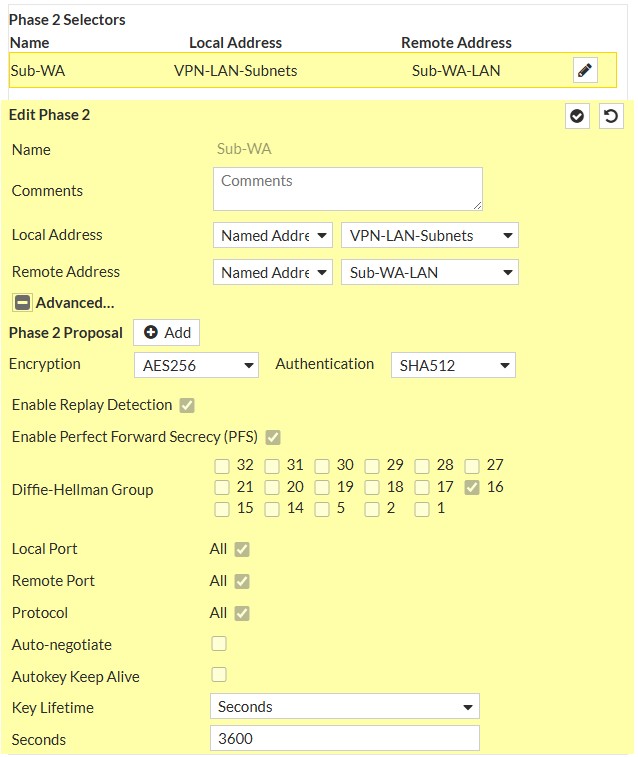
- Now it is time to add the static route. Navigate to:
Network - Static Routes - Create New
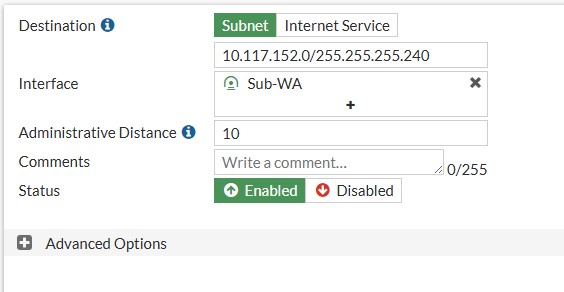
- Now we need to create a bi-directional set of policies to allow traffic to flow. Navigate to:
Policy and Objects - Firewall Policy and click on Create New
First we need to create the Remote site to Local policy as noted on the screenshot below.
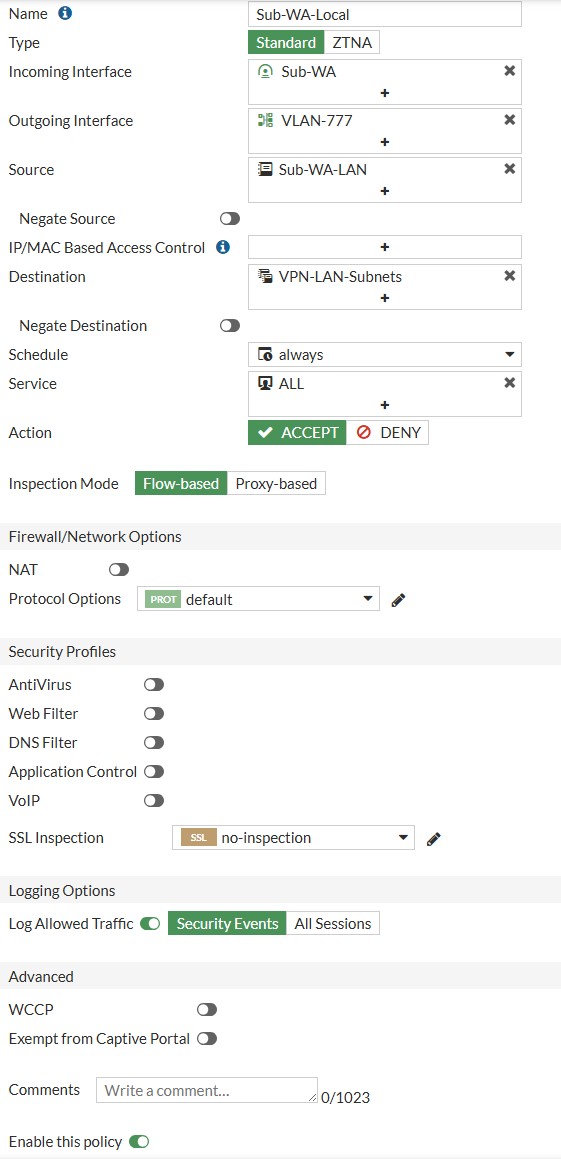
Second we need to create the Local site to Remote policy as noted on the screenshot below.
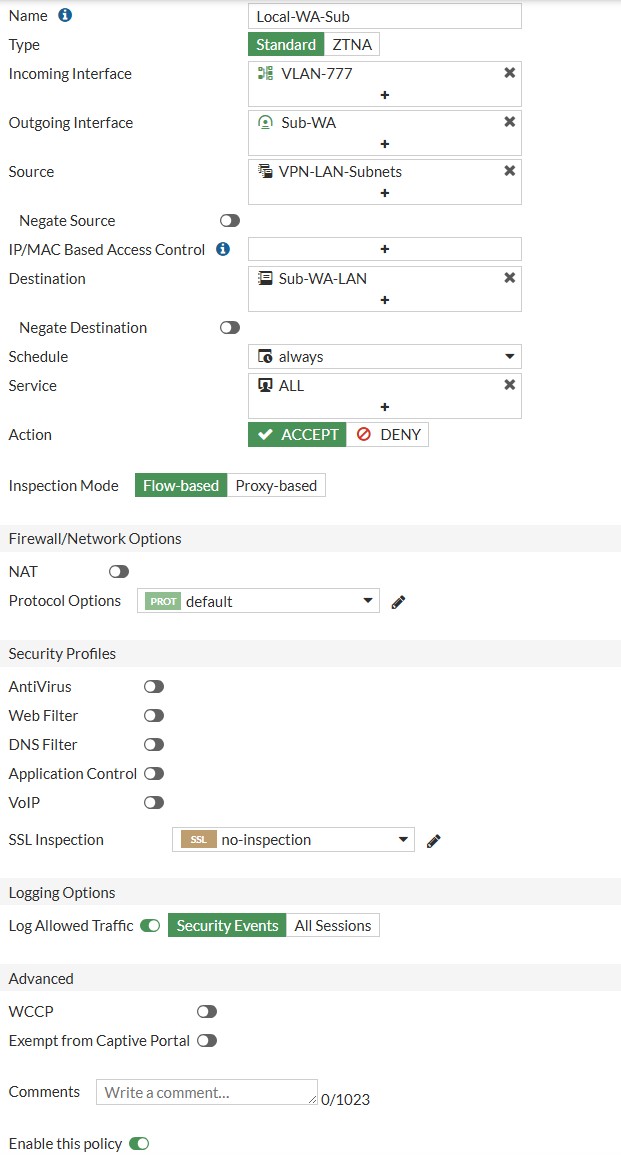
- All done. Wait a minute for the tunnel to establish and click on VPN - IPsec Tunnels and you will see it up with a green icon.